Shared inbox
One inbox your whole team can actually share.
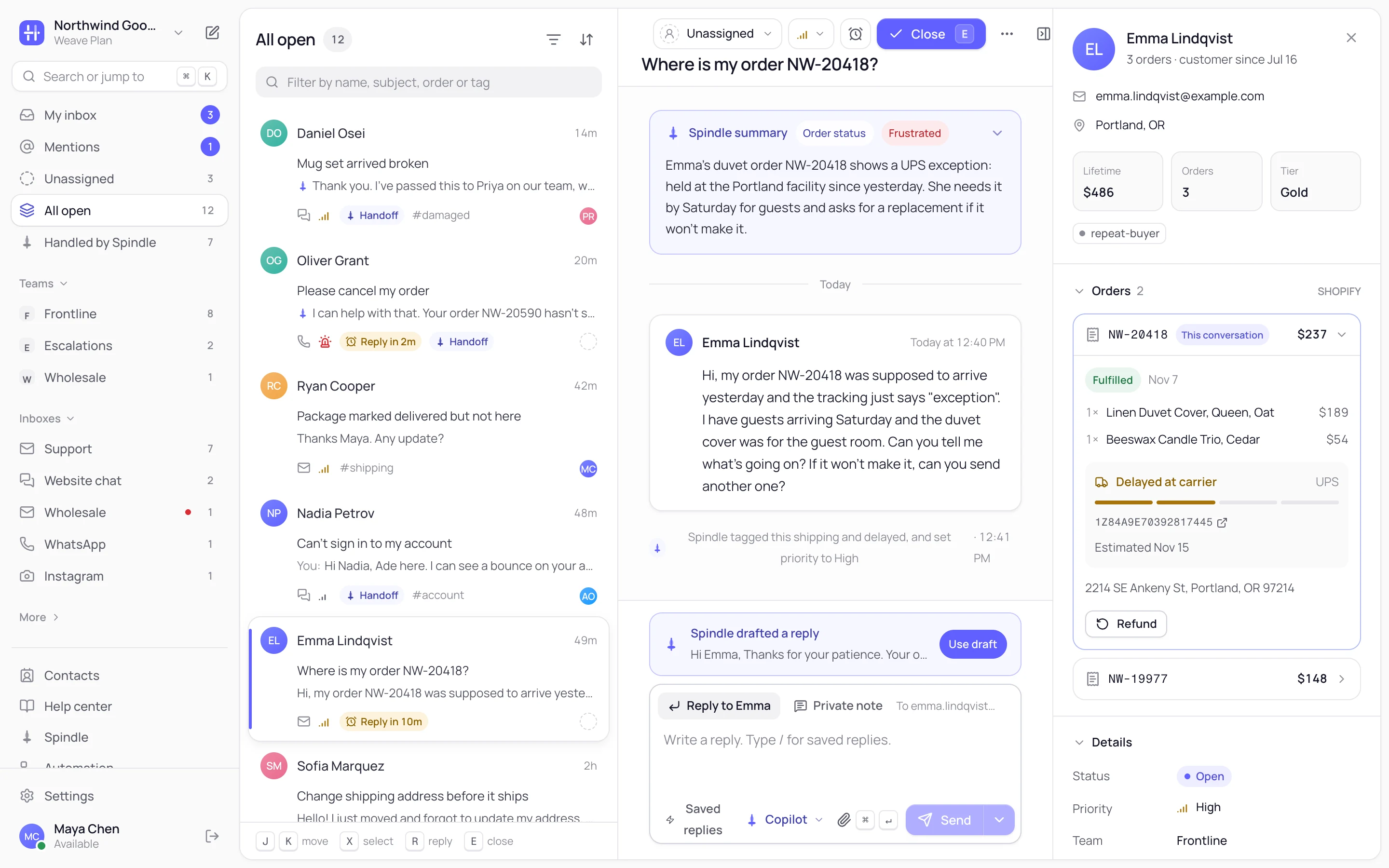
Loomstrat Helpdesk's shared inbox puts email, live chat, WhatsApp, Instagram and Messenger conversations in one list. Teammates assign, tag, snooze and reply without stepping on each other, see the customer's orders beside every message, and move through the queue from the keyboard.
5
channels in one queue
5s
to undo any send
0
per-seat fees
The problem
Most small teams answer customers from a shared Gmail login, a chat tool and a spreadsheet. Two people reply to the same customer, nobody owns the angry one, and the context lives in five tabs.
What you get
What shared inbox does for you.
Every capability below is included in Loomstrat Helpdesk. Plan limits are listed on the pricing page.
Every channel, one list
Email, live chat, WhatsApp, Instagram and Messenger arrive as conversations in the same queue, threaded per customer.
Clear ownership
Assign to a person or team, round-robin by load, or let a rule decide. Mine, Unassigned and Mentions views keep everyone honest.
Collision detection
See who is viewing or typing in a conversation, so two people never send two different answers.
Private notes and @mentions
Discuss a refund or a tricky customer in a highlighted note the customer never sees. Mention a teammate to pull them in.
Saved replies with variables
Type / to insert an answer that fills in the customer's name, order number and tracking link.
Undo-send and snooze
Five seconds to take back a reply. Snooze a conversation until tomorrow morning or until the customer writes back.
Keyboard first
J and K to move, R to reply, E to close, ⌘K to jump anywhere. Teams clear a queue without touching the mouse.
Bulk actions
Select a dozen conversations and assign, tag, close or snooze them in one move.
How it works
Live in three steps.
- 01
Connect your channels
Sign in with Google or Microsoft, add the chat widget, link WhatsApp and Instagram. Takes about ten minutes.
- 02
Set who owns what
Create teams, pick a default assignment, and add a few rules for VIPs or wholesale.
- 03
Work the queue
Open a conversation, read the order beside it, reply with a saved answer or a Spindle draft, close and move on.
Questions
Shared inbox, answered.
Can I keep my existing support email address?
Yes. Connect support@yourstore.com through Google Workspace or Microsoft 365, or forward it to your Helpdesk address. Customers keep writing to the same address and see replies from it.
How does collision detection work?
When a teammate opens or starts typing in a conversation, everyone else sees their avatar and a typing indicator on that conversation, in the list and in the thread.
Is there a limit on conversations?
No. Every plan includes unlimited conversations and contacts. Plans differ by teammates, inboxes and how many conversations Spindle resolves each month.

Bring every conversation into one thread.
Set up in an afternoon, with a 14-day money-back guarantee. Keep your support address, your store and your team.
From $24 a month for the whole team. Cancel any time.